从 Deepseek v4 pro 3d魔方简要测试 帖子继续
原本测试 只在cherry studio 里面使用auto模式测试
在cherry studio 不知道如何改用max思考模式
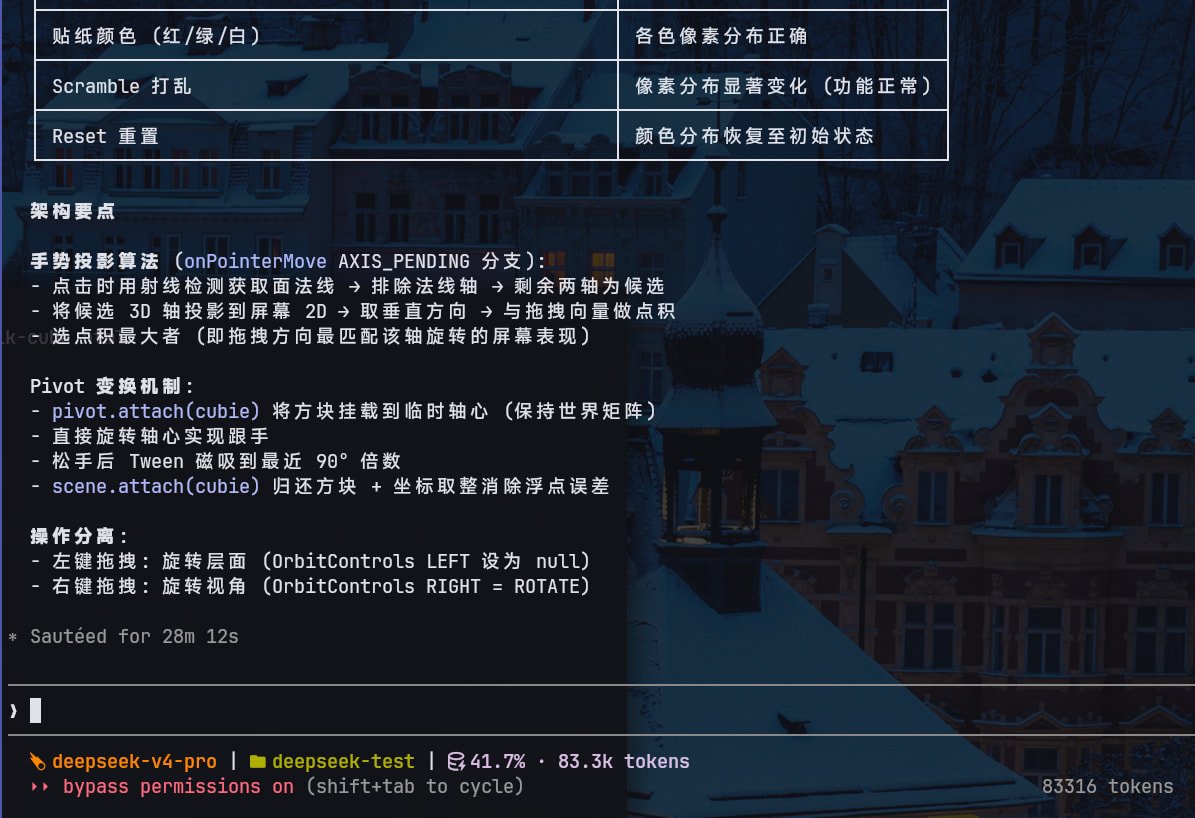
现在使用claude + max 思考等级测试
api 耗费 4.39元
思考加首次交付时间: 28m12s
https://imgbed.snemc.cn/i/10a7ac09545f.gif(图片大于 4 MB)
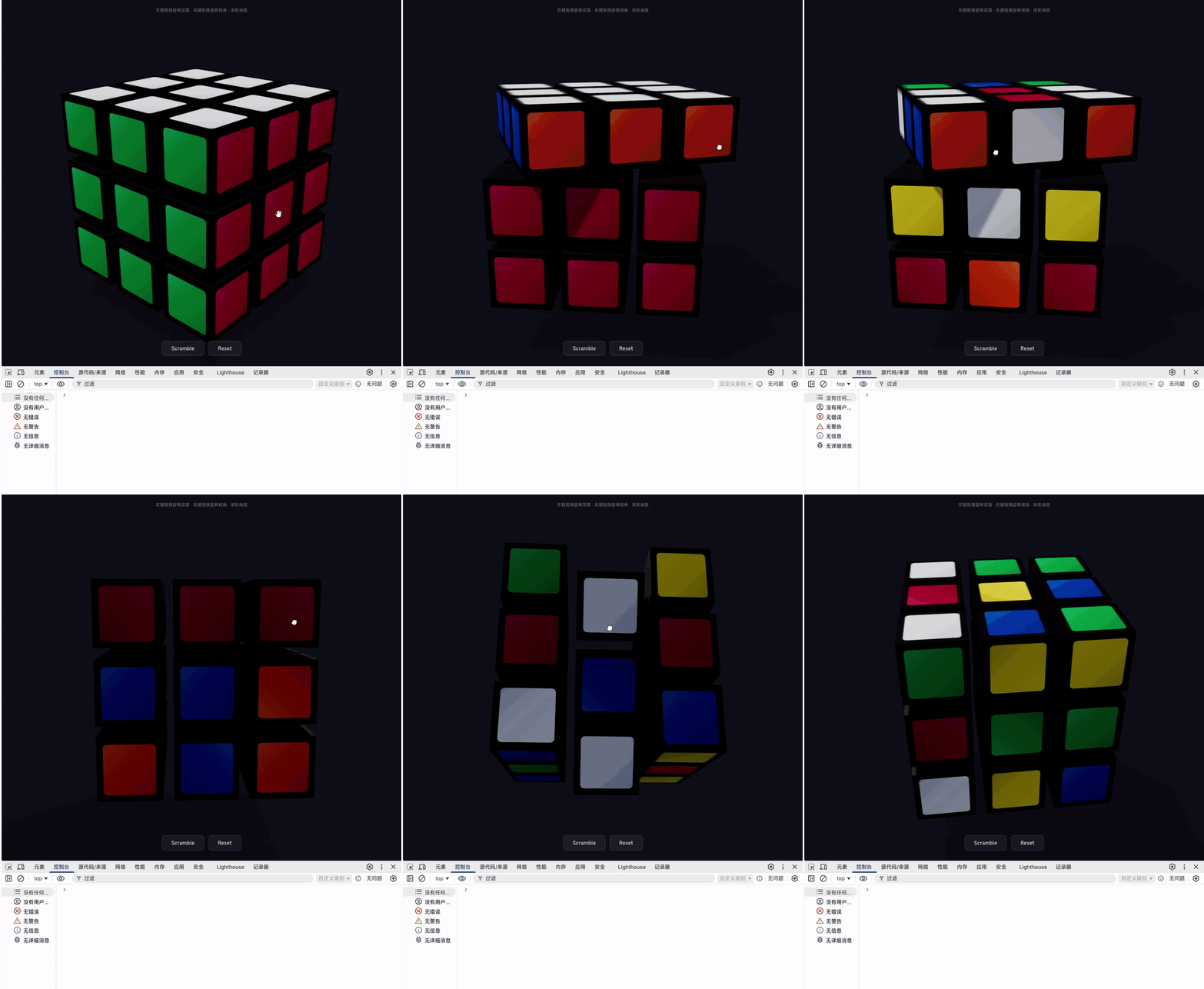
测试结果:
非常丝滑
问题:
当视角转到背面的时候鼠标操作垂直方向拖动魔方,旋转角度是反的
在claude中看到deepseek完成一次写入后没有立马交付,而是又自己读了文件进行审阅, 又自己写了python脚本测试不知道怎样用python来测试html的
<!DOCTYPE html>
<html lang="zh-CN">
<head>
<meta charset="UTF-8">
<meta name="viewport" content="width=device-width, initial-scale=1.0">
<title>3x3 魔方</title>
<style>
*, *::before, *::after { margin: 0; padding: 0; box-sizing: border-box; }
body {
background: #0f0f1a;
overflow: hidden;
font-family: -apple-system, BlinkMacSystemFont, 'Segoe UI', sans-serif;
user-select: none;
-webkit-user-select: none;
height: 100vh;
width: 100vw;
}
#container {
position: fixed;
inset: 0;
cursor: grab;
}
#container.grabbing { cursor: grabbing; }
#container.orbiting { cursor: move; }
#ui {
position: fixed;
bottom: 32px;
left: 50%;
transform: translateX(-50%);
display: flex;
gap: 14px;
z-index: 10;
}
#ui button {
padding: 12px 28px;
border: 1px solid rgba(255,255,255,0.16);
border-radius: 10px;
background: rgba(255,255,255,0.06);
backdrop-filter: blur(14px);
-webkit-backdrop-filter: blur(14px);
color: #ccc;
font-size: 15px;
font-weight: 500;
letter-spacing: 0.03em;
cursor: pointer;
transition: background 0.2s, border-color 0.2s, transform 0.15s;
}
#ui button:hover {
background: rgba(255,255,255,0.12);
border-color: rgba(255,255,255,0.28);
}
#ui button:active {
transform: scale(0.96);
}
#hint {
position: fixed;
top: 24px;
left: 50%;
transform: translateX(-50%);
color: rgba(255,255,255,0.38);
font-size: 12.5px;
letter-spacing: 0.04em;
pointer-events: none;
z-index: 10;
}
</style>
</head>
<body>
<div id="container"></div>
<div id="hint">左键拖拽旋转层面 · 右键拖拽旋转视角 · 滚轮缩放</div>
<div id="ui">
<button id="scramble">Scramble</button>
<button id="reset">Reset</button>
</div>
<script type="importmap">
{
"imports": {
"three": "https://unpkg.com/three@0.160.0/build/three.module.js",
"three/addons/": "https://unpkg.com/three@0.160.0/examples/jsm/",
"@tweenjs/tween.js": "https://unpkg.com/@tweenjs/tween.js@20.0.0/dist/tween.esm.js"
}
}
</script>
<script type="module">
import * as THREE from 'three';
import { OrbitControls } from 'three/addons/controls/OrbitControls.js';
import * as TWEEN from '@tweenjs/tween.js';
// ============================================================
// 常量
// ============================================================
const CUBIE_SIZE = 0.85;
const EPSILON = 0.35;
const SENSITIVITY = 0.007;
const AXIS_THRESHOLD = 4;
const SNAP_MS = 180;
const SCRAMBLE_MS = 75;
const SCRAMBLE_N = 22;
// Rubik 标准配色 (白顶绿前)
const COLORS = {
right: '#B71234',
left: '#FF5800',
up: '#FFFFFF',
down: '#FFD500',
front: '#009B48',
back: '#0046AD',
};
const AXES = {
x: new THREE.Vector3(1, 0, 0),
y: new THREE.Vector3(0, 1, 0),
z: new THREE.Vector3(0, 0, 1),
};
const AXIS_NAMES = ['x', 'y', 'z'];
// ============================================================
// DOM
// ============================================================
const container = document.getElementById('container');
const btnScramble = document.getElementById('scramble');
const btnReset = document.getElementById('reset');
// ============================================================
// Three.js 基础设施
// ============================================================
const renderer = new THREE.WebGLRenderer({ antialias: true });
renderer.setPixelRatio(Math.min(window.devicePixelRatio, 2));
renderer.setSize(window.innerWidth, window.innerHeight);
renderer.shadowMap.enabled = true;
renderer.shadowMap.type = THREE.PCFSoftShadowMap;
renderer.toneMapping = THREE.ACESFilmicToneMapping;
renderer.toneMappingExposure = 1.15;
container.appendChild(renderer.domElement);
const scene = new THREE.Scene();
scene.background = new THREE.Color('#0f0f1a');
scene.fog = new THREE.Fog('#0f0f1a', 9, 32);
const camera = new THREE.PerspectiveCamera(
40, window.innerWidth / window.innerHeight, 0.5, 40
);
camera.position.set(4.8, 3.0, 5.4);
camera.lookAt(0, 0, 0);
// ---- OrbitControls: 仅右键旋转视角, 滚轮缩放 ----
const orbitControls = new OrbitControls(camera, renderer.domElement);
orbitControls.target.set(0, 0, 0);
orbitControls.enableDamping = true;
orbitControls.dampingFactor = 0.07;
orbitControls.minDistance = 3.5;
orbitControls.maxDistance = 12;
orbitControls.maxPolarAngle = Math.PI * 0.75;
orbitControls.mouseButtons = {
LEFT: null,
MIDDLE: THREE.MOUSE.DOLLY,
RIGHT: THREE.MOUSE.ROTATE,
};
orbitControls.touches = {
ONE: THREE.TOUCH.ROTATE,
TWO: THREE.TOUCH.DOLLY_PAN,
};
orbitControls.update();
// ============================================================
// 光照与阴影
// ============================================================
scene.add(new THREE.AmbientLight('#8899bb', 0.8));
scene.add(new THREE.HemisphereLight('#ffffff', '#334455', 0.45));
const dirLight = new THREE.DirectionalLight('#ffffff', 1.7);
dirLight.position.set(5, 12, 6);
dirLight.castShadow = true;
dirLight.shadow.mapSize.width = 2048;
dirLight.shadow.mapSize.height = 2048;
dirLight.shadow.camera.near = 0.5;
dirLight.shadow.camera.far = 40;
dirLight.shadow.camera.left = -8;
dirLight.shadow.camera.right = 8;
dirLight.shadow.camera.top = 8;
dirLight.shadow.camera.bottom = -8;
dirLight.shadow.bias = -0.0002;
dirLight.shadow.normalBias = 0.015;
scene.add(dirLight);
// 阴影接收面
const ground = new THREE.Mesh(
new THREE.PlaneGeometry(18, 18),
new THREE.ShadowMaterial({ opacity: 0.25 })
);
ground.rotation.x = -Math.PI / 2;
ground.position.y = -2.3;
ground.receiveShadow = true;
scene.add(ground);
// ============================================================
// Canvas 纹理 — 圆角贴纸 + 塑料黑边 + 高光
// ============================================================
function createStickerTexture(hexColor) {
const S = 256;
const cv = document.createElement('canvas');
cv.width = S;
cv.height = S;
const ctx = cv.getContext('2d');
// 塑料黑底
ctx.fillStyle = '#141414';
ctx.fillRect(0, 0, S, S);
// 圆角矩形
const m = 26;
const r = 15;
const x = m, y = m, w = S - 2 * m, h = S - 2 * m;
function roundRect(cx, cy, cw, ch, cr) {
ctx.beginPath();
ctx.moveTo(cx + cr, cy);
ctx.arcTo(cx + cw, cy, cx + cw, cy + cr, cr);
ctx.arcTo(cx + cw, cy + ch, cx + cw - cr, cy + ch, cr);
ctx.arcTo(cx, cy + ch, cx, cy + ch - cr, cr);
ctx.arcTo(cx, cy, cx + cr, cy, cr);
ctx.closePath();
}
roundRect(x, y, w, h, r);
ctx.fillStyle = hexColor;
ctx.fill();
// 对角线高光渐变 (模拟贴纸光泽)
const grad = ctx.createLinearGradient(x, y, x + w, y + h);
grad.addColorStop(0, 'rgba(255,255,255,0.24)');
grad.addColorStop(0.3, 'rgba(255,255,255,0.05)');
grad.addColorStop(0.55, 'rgba(0,0,0,0)');
grad.addColorStop(1, 'rgba(0,0,0,0.14)');
roundRect(x, y, w, h, r);
ctx.fillStyle = grad;
ctx.fill();
const tex = new THREE.CanvasTexture(cv);
tex.colorSpace = THREE.SRGBColorSpace;
tex.minFilter = THREE.LinearMipmapLinearFilter;
tex.magFilter = THREE.LinearFilter;
tex.generateMipmaps = true;
return tex;
}
const stickerTextures = {};
for (const [key, color] of Object.entries(COLORS)) {
stickerTextures[key] = createStickerTexture(color);
}
// 贴纸材质
function stickerMat(tex) {
return new THREE.MeshStandardMaterial({ map: tex, roughness: 0.30, metalness: 0.02 });
}
const sMat = {
right: stickerMat(stickerTextures.right),
left: stickerMat(stickerTextures.left),
up: stickerMat(stickerTextures.up),
down: stickerMat(stickerTextures.down),
front: stickerMat(stickerTextures.front),
back: stickerMat(stickerTextures.back),
};
// 不可见面的黑色塑料
const blackMat = new THREE.MeshStandardMaterial({
color: '#181818', roughness: 0.55, metalness: 0.05,
});
// ============================================================
// 方块构建 — 3×3×3 = 27
// ============================================================
const cubies = [];
const geo = new THREE.BoxGeometry(CUBIE_SIZE, CUBIE_SIZE, CUBIE_SIZE);
// 材质数组顺序: [+X, -X, +Y, -Y, +Z, -Z]
function buildMaterials(lx, ly, lz) {
return [
lx === 1 ? sMat.right : blackMat,
lx === -1 ? sMat.left : blackMat,
ly === 1 ? sMat.up : blackMat,
ly === -1 ? sMat.down : blackMat,
lz === 1 ? sMat.front : blackMat,
lz === -1 ? sMat.back : blackMat,
];
}
for (let lx = -1; lx <= 1; lx++) {
for (let ly = -1; ly <= 1; ly++) {
for (let lz = -1; lz <= 1; lz++) {
const mesh = new THREE.Mesh(geo, buildMaterials(lx, ly, lz));
mesh.position.set(lx, ly, lz);
mesh.castShadow = true;
mesh.receiveShadow = true;
mesh.userData.origin = { x: lx, y: ly, z: lz };
scene.add(mesh);
cubies.push(mesh);
}
}
}
// ============================================================
// 交互状态机
// ============================================================
const IDLE = 'idle';
const AXIS_PENDING = 'axis_pending';
const ROTATING = 'rotating';
const ANIMATING = 'animating';
let state = IDLE;
let clickedCubie = null;
let clickedNormal = null; // 世界空间面法线
let candidateAxes = []; // [{ name, worldAxis, layer, screenDir, perpDir }]
let dragStart = new THREE.Vector2();
let chosenAxis = null; // 确定后的旋转轴信息 (含 perpDir)
let pivot = null;
let totalAngle = 0;
let animTween = null;
const raycaster = new THREE.Raycaster();
raycaster.far = 20;
// ============================================================
// 工具
// ============================================================
/** 3D 世界轴 → 2D 屏幕单位方向 */
function projectAxisToScreen(axis3D) {
const o = new THREE.Vector3(0, 0, 0);
const t = axis3D.clone();
o.project(camera);
t.project(camera);
const W = renderer.domElement.clientWidth;
const H = renderer.domElement.clientHeight;
const sO = new THREE.Vector2((o.x + 1) / 2 * W, (1 - o.y) / 2 * H);
const sT = new THREE.Vector2((t.x + 1) / 2 * W, (1 - t.y) / 2 * H);
const d = sT.clone().sub(sO);
return d.length() < 1e-8 ? d : d.normalize();
}
function getMouse(e) {
const r = renderer.domElement.getBoundingClientRect();
return new THREE.Vector2(e.clientX - r.left, e.clientY - r.top);
}
/** 射线检测 — 返回命中的方块及其世界空间面法线 */
function raycastCubie(mouse) {
const ndc = new THREE.Vector2(
(mouse.x / renderer.domElement.clientWidth) * 2 - 1,
-(mouse.y / renderer.domElement.clientHeight) * 2 + 1,
);
raycaster.setFromCamera(ndc, camera);
const hits = raycaster.intersectObjects(cubies, false);
if (hits.length === 0) return null;
const hit = hits[0];
const n = hit.face.normal.clone();
n.transformDirection(hit.object.matrixWorld);
return { cubie: hit.object, normal: n };
}
/**
* 根据面法线确定 2 个候选旋转轴。
* 逻辑: 法线沿某主轴的 → 排除该轴 → 候选为其余两轴。
*/
function getCandidateAxes(faceNormal) {
const a = [Math.abs(faceNormal.x), Math.abs(faceNormal.y), Math.abs(faceNormal.z)];
let dom = 'z';
if (a[0] >= a[1] && a[0] >= a[2]) dom = 'x';
else if (a[1] >= a[0] && a[1] >= a[2]) dom = 'y';
const others = AXIS_NAMES.filter(n => n !== dom);
return others.map(name => {
const comp = { x: 0, y: 1, z: 2 }[name];
const wp = new THREE.Vector3();
clickedCubie.getWorldPosition(wp);
return {
name,
worldAxis: AXES[name].clone(),
layer: Math.round(wp.getComponent(comp)),
screenDir: null,
perpDir: null,
};
});
}
/** 返回属于指定层的所有方块 (基于世界坐标) */
function findLayerCubies(axisName, layerValue) {
const ci = { x: 0, y: 1, z: 2 }[axisName];
return cubies.filter(c => {
const wp = new THREE.Vector3();
c.getWorldPosition(wp);
return Math.abs(wp.getComponent(ci) - layerValue) < EPSILON;
});
}
/** 创建临时轴心并将选中方块挂载上去 */
function createPivot(layerCubies) {
const p = new THREE.Group();
scene.add(p);
for (const c of layerCubies) p.attach(c);
return p;
}
/** 归还方块到场景, 消除浮点累积误差, 移除轴心 */
function cleanupPivot() {
if (!pivot) return;
const children = [...pivot.children];
for (const c of children) scene.attach(c);
for (const c of children) {
c.position.x = Math.round(c.position.x);
c.position.y = Math.round(c.position.y);
c.position.z = Math.round(c.position.z);
c.rotation.x = Math.round(c.rotation.x / (Math.PI / 2)) * (Math.PI / 2);
c.rotation.y = Math.round(c.rotation.y / (Math.PI / 2)) * (Math.PI / 2);
c.rotation.z = Math.round(c.rotation.z / (Math.PI / 2)) * (Math.PI / 2);
}
scene.remove(pivot);
pivot = null;
}
/** 绝对设置轴心旋转 (非增量, 避免误差累积) */
function setPivotRotation(axis, rad) {
pivot.rotation.set(0, 0, 0);
pivot.rotateOnWorldAxis(axis, rad);
}
/** 重置交互状态 */
function resetInteraction() {
state = IDLE;
clickedCubie = null;
clickedNormal = null;
candidateAxes = [];
chosenAxis = null;
totalAngle = 0;
container.classList.remove('grabbing');
}
// ============================================================
// 程序化旋转 (供 Scramble 使用)
// ============================================================
function executeRotation(axisName, layerValue, targetAngle, duration, cb) {
if (state !== IDLE && state !== ANIMATING) { if (cb) cb(); return; }
state = ANIMATING;
const axis = AXES[axisName].clone();
const layerCubies = findLayerCubies(axisName, layerValue);
if (layerCubies.length === 0) { state = IDLE; if (cb) cb(); return; }
const p = createPivot(layerCubies);
const t = { angle: 0 };
animTween = new TWEEN.Tween(t)
.to({ angle: targetAngle }, duration)
.easing(TWEEN.Easing.Quadratic.InOut)
.onUpdate(({ angle }) => {
p.rotation.set(0, 0, 0);
p.rotateOnWorldAxis(axis, angle);
})
.onComplete(() => {
const kids = [...p.children];
for (const k of kids) scene.attach(k);
for (const k of kids) {
k.position.x = Math.round(k.position.x);
k.position.y = Math.round(k.position.y);
k.position.z = Math.round(k.position.z);
k.rotation.x = Math.round(k.rotation.x / (Math.PI / 2)) * (Math.PI / 2);
k.rotation.y = Math.round(k.rotation.y / (Math.PI / 2)) * (Math.PI / 2);
k.rotation.z = Math.round(k.rotation.z / (Math.PI / 2)) * (Math.PI / 2);
}
scene.remove(p);
animTween = null;
state = IDLE;
if (cb) cb();
})
.start();
}
// ============================================================
// 指针事件 — 手势交互核心
// ============================================================
function onPointerDown(e) {
if (e.button !== 0) return;
if (state !== IDLE) return;
if (animTween) { animTween.stop(); animTween = null; }
const m = getMouse(e);
const hit = raycastCubie(m);
if (!hit) return;
clickedCubie = hit.cubie;
clickedNormal = hit.normal.clone();
candidateAxes = getCandidateAxes(clickedNormal);
dragStart.copy(m);
state = AXIS_PENDING;
container.classList.add('grabbing');
}
function onPointerMove(e) {
const m = getMouse(e);
if (state === AXIS_PENDING) {
const delta = m.clone().sub(dragStart);
if (delta.length() < AXIS_THRESHOLD) return;
// ----------------------------------------------------
// 手势投影算法 — 选择旋转轴
// 将候选 3D 轴投影到 2D 屏幕空间, 计算拖拽方向
// 与各投影轴**垂直方向**的点积, 取最大者。
// 这确保无论视角如何, 拖拽方向总是匹配最自然
// 的旋转轴 (旋转在屏幕上表现为垂直于旋转轴的运动)。
// ----------------------------------------------------
const dragDir = delta.clone().normalize();
let bestAxis = null;
let bestDot = -Infinity;
for (const cand of candidateAxes) {
cand.screenDir = projectAxisToScreen(cand.worldAxis);
// 垂直于投影轴的方向 = 旋转在屏幕上的运动方向
cand.perpDir = new THREE.Vector2(-cand.screenDir.y, cand.screenDir.x);
const dot = Math.abs(dragDir.dot(cand.perpDir));
if (dot > bestDot) { bestDot = dot; bestAxis = cand; }
}
if (!bestAxis) return;
chosenAxis = bestAxis;
// 找层并挂载到临时轴心
const layerCubies = findLayerCubies(chosenAxis.name, chosenAxis.layer);
if (layerCubies.length === 0) { resetInteraction(); return; }
pivot = createPivot(layerCubies);
totalAngle = 0;
state = ROTATING;
}
if (state === ROTATING) {
// ----------------------------------------------------
// 1:1 跟手旋转
// - 将拖拽向量投影到 screenDir 的垂直方向
// - 摄像头位置修正符号, 保证各角度操作一致
// ----------------------------------------------------
const screenAxis = projectAxisToScreen(chosenAxis.worldAxis);
const perpDir = new THREE.Vector2(-screenAxis.y, screenAxis.x);
const dragTotal = m.clone().sub(dragStart);
const dragAmount = dragTotal.dot(perpDir); // 带符号的拖拽分量
// 符号修正: 摄像头位于旋转轴哪一侧决定旋转方向
const camDir = camera.position.clone().normalize();
const camSign = chosenAxis.worldAxis.dot(camDir) > 0 ? 1 : -1;
const angle = dragAmount * SENSITIVITY * camSign;
setPivotRotation(chosenAxis.worldAxis, angle);
totalAngle = angle;
}
}
function onPointerUp(_e) {
if (state === AXIS_PENDING) { resetInteraction(); return; }
if (state === ROTATING) {
// 磁吸到最近 90° 倍数
const snapTarget = Math.round(totalAngle / (Math.PI / 2)) * (Math.PI / 2);
if (Math.abs(snapTarget - totalAngle) < 0.0005) {
cleanupPivot();
resetInteraction();
return;
}
state = ANIMATING;
const axis = chosenAxis.worldAxis.clone();
const start = totalAngle;
const t = { angle: start };
animTween = new TWEEN.Tween(t)
.to({ angle: snapTarget }, SNAP_MS)
.easing(TWEEN.Easing.Quadratic.Out)
.onUpdate(({ angle }) => setPivotRotation(axis, angle))
.onComplete(() => {
cleanupPivot();
animTween = null;
resetInteraction();
})
.start();
}
}
// ============================================================
// 右键/中键视觉效果
// ============================================================
window.addEventListener('contextmenu', e => e.preventDefault());
window.addEventListener('pointerdown', e => {
if (e.button === 2 || e.button === 1) container.classList.add('orbiting');
});
window.addEventListener('pointerup', () => container.classList.remove('orbiting'));
// ============================================================
// Scramble / Reset
// ============================================================
function scramble() {
if (state !== IDLE) return;
const moves = [];
let prevAxis = null, prevLayer = null;
for (let i = 0; i < SCRAMBLE_N; i++) {
let ax, la;
do {
ax = AXIS_NAMES[Math.floor(Math.random() * 3)];
la = [-1, 0, 1][Math.floor(Math.random() * 3)];
} while (ax === prevAxis && la === prevLayer);
prevAxis = ax; prevLayer = la;
moves.push({ axis: ax, layer: la, angle: (Math.random() < 0.5 ? 1 : -1) * Math.PI / 2 });
}
function run(idx) {
if (idx >= moves.length) { state = IDLE; return; }
const mv = moves[idx];
executeRotation(mv.axis, mv.layer, mv.angle, SCRAMBLE_MS, () => run(idx + 1));
}
state = ANIMATING;
run(0);
}
function resetCube() {
if (state === ANIMATING && animTween) { animTween.stop(); animTween = null; }
// 若有活跃 pivot, 先归还方块但不取整 (避免跳变)
if (pivot) {
const kids = [...pivot.children];
for (const k of kids) scene.attach(k);
scene.remove(pivot);
pivot = null;
}
resetInteraction();
state = ANIMATING;
let done = 0;
const N = cubies.length;
cubies.forEach(c => {
const o = c.userData.origin;
const sp = c.position.clone();
const sr = c.rotation.clone();
const tw = { px: sp.x, py: sp.y, pz: sp.z, rx: sr.x, ry: sr.y, rz: sr.z };
new TWEEN.Tween(tw)
.to({ px: o.x, py: o.y, pz: o.z, rx: 0, ry: 0, rz: 0 }, 520)
.easing(TWEEN.Easing.Quadratic.InOut)
.onUpdate(v => { c.position.set(v.px, v.py, v.pz); c.rotation.set(v.rx, v.ry, v.rz); })
.onComplete(() => {
c.position.set(o.x, o.y, o.z);
c.rotation.set(0, 0, 0);
done++;
if (done >= N) state = IDLE;
})
.start();
});
}
btnScramble.addEventListener('click', scramble);
btnReset.addEventListener('click', resetCube);
// ============================================================
// 事件绑定
// ============================================================
renderer.domElement.addEventListener('pointerdown', onPointerDown);
window.addEventListener('pointermove', onPointerMove);
window.addEventListener('pointerup', onPointerUp);
window.addEventListener('resize', () => {
camera.aspect = window.innerWidth / window.innerHeight;
camera.updateProjectionMatrix();
renderer.setSize(window.innerWidth, window.innerHeight);
});
// ============================================================
// 渲染循环
// ============================================================
function animate(time) {
requestAnimationFrame(animate);
TWEEN.update(time);
orbitControls.update();
renderer.render(scene, camera);
}
requestAnimationFrame(animate);
</script>
</body>
</html>
3 个帖子 - 3 位参与者
来源: linux.do查看原文