codex pets 挺好玩的,虽然跟很多年前的桌宠差不多,但是可以自己创建的感受还是完全不一样,看了论坛里佬们发的帖子,在 codex 中使用 skills 生成要消耗5小时额度,心疼额度,于是就去 ChatGPT 网页端试了试,一番波折之后,还是弄出来了。
做了个Q版的 [今汐](Codex Pets),我还是很满意的,上传到 codex-pets了。
顺便说一下踩的坑啊:
一开始我打开 ChatGPT 之后问能不能做,然后丢了个表情包过去,告诉我最好再给一个全身的,我就去官网找了个全身的图丢过去了,gpt-images-2 是真的有够猛的,直接给我画了一下一张图,有9个状态按行排列好了,不仔细看那就是和已经能用的成品差不多了。但是我打开仔细看,发现排列不完全对,大小和位置都有偏差;
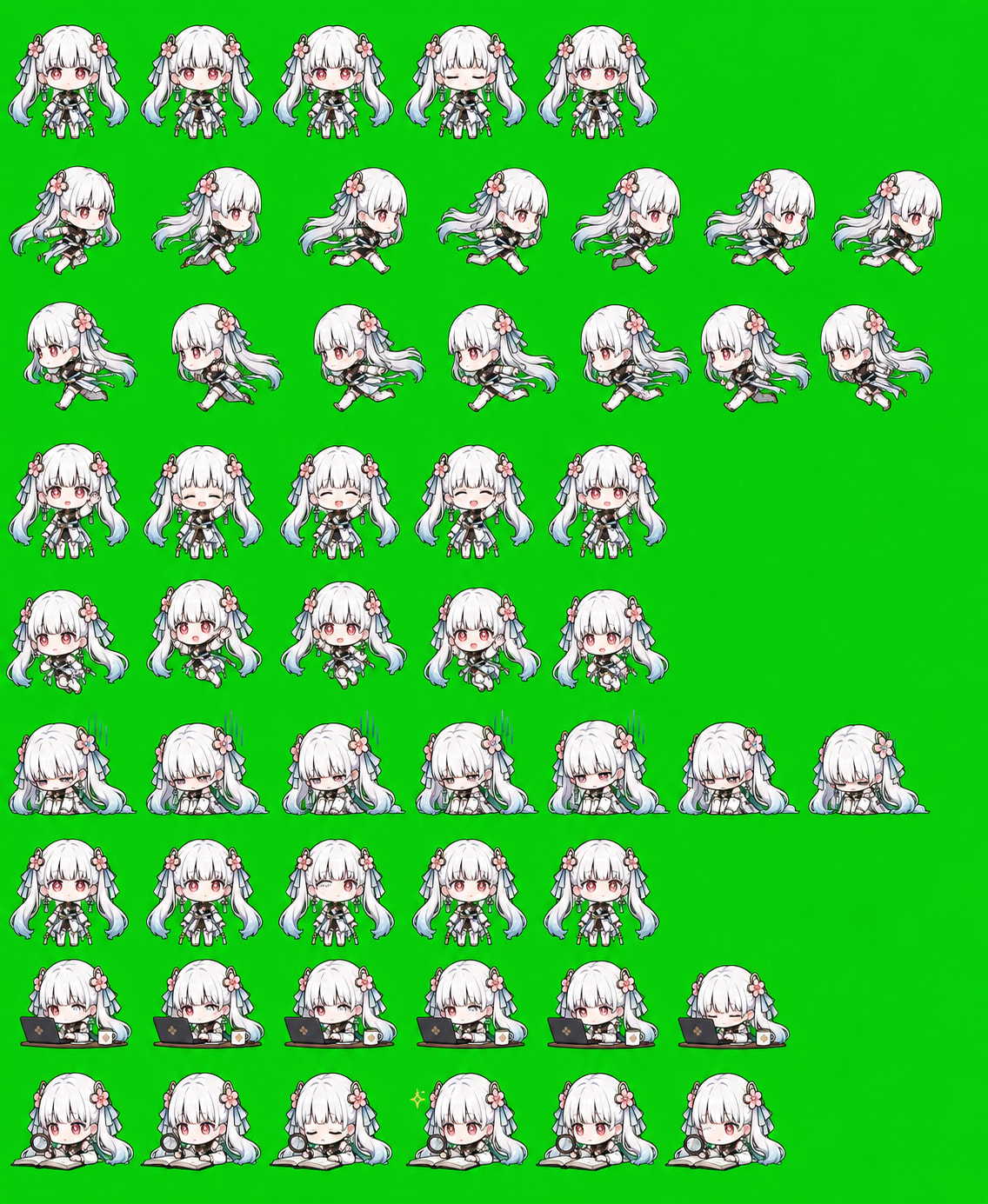
于是换了个做法,让 gpt 按照状态一行行生成,大小间距固定,这次生成的没啥问题,大概是下面的样子

现在的 ChatGPT 网页端其实也是 agent 模式了,你可以让它去使用代码处理东西的,比如现在已经拿到每一个状态的一组帧了,让gpt自己把这些图片背景绿幕抠图好然后按照 pets 约定的状态顺序拼接起来就好了,gpt 自己应该是有一个 linux 容器之类的执行环境,拼接好后会把文件发出来给你下载,还可以让它把 pet.json 也写好直接一起打包成压缩吧给你。
到这里基本完事了,最后合成的大图只有一点点的小瑕疵,我手动修了一下,然后本地用 hatch-pet 这个 skills 中的 script 来验证一下看了感觉是那么回事

顺便说一下,如果让 gpt-images-2 生成图片时没有很准确,就把 skills 的 references 的一些约定发过去,重要的就是这部分:
Format: PNG or WebP.
Dimensions: 1536x1872.
Grid: 8 columns x 9 rows.
Cell: 192x208.
Background: transparent.
Unused cells: fully transparent.


The Codex app reads one fixed atlas: 8 columns, 9 rows, 192x208 pixels per cell.

Row	State	Used columns	Durations
0	idle	0-5	280, 110, 110, 140, 140, 320 ms
1	running-right	0-7	120 ms each, final 220 ms
2	running-left	0-7	120 ms each, final 220 ms
3	waving	0-3	140 ms each, final 280 ms
4	jumping	0-4	140 ms each, final 280 ms
5	failed	0-7	140 ms each, final 240 ms
6	waiting	0-5	150 ms each, final 260 ms
7	running	0-5	120 ms each, final 220 ms
8	review	0-5	150 ms each, final 280 ms
Unused cells after each row's final used column must be fully transparent.

Row Purposes
idle: calm, low-distraction breathing/blinking loop; use as the reduced-motion first frame. Keep motion subtle and persona-preserving.
running-right: locomotion to the right; 8-frame loop should read directionally.
running-left: mirrored or redrawn locomotion to the left; do not simply reuse right-facing frames unless the design is symmetric.
waving: greeting or attention gesture; clear start, raised gesture, return.
jumping: anticipation, lift, peak, descent, settle.
failed: error/sad/deflated reaction; readable but not visually noisy.
waiting: patient idle variant; glance, small bounce, or prop motion.
running: active working/in-progress loop, as if the pet is busy running a task. This row is not foot-running; avoid jogging, sprinting, treadmill poses, raised knees, long steps, pumping arms, or directional travel.
review: focused/inspecting/thinking loop suitable for review state.
完整的内容看一下 [hatch-pet skills]( skills/skills/.curated/hatch-pet/references at main · openai/skills · GitHub )
最后放一下成果:



3 个帖子 - 2 位参与者
来源: LinuxDo 最新话题查看原文