背景:单位电脑挂了两套VPN,内网IP需要内部的VPN访问,我访问外网用的sing-box软件
现在各种cli工具 终端中要配置 http_proxy 才能访问github、npm、等各种开发资源
但是我配置了 http_proxy变量后,终端访问内网的git出问题了
powershell 终端配置代理,快速开启关闭
-
powershell 其实和bash 等linux终端一样 也有一个 profile文件,里面的配置项目,每次开powershell 都会启用的
echo $ProFILE可以查看路径

-
快速配置 使用
notepad $PROFILE打开编辑
$env:HTTP_PROXY="http://127.0.0.1:20122"
$env:HTTPS_PROXY="http://127.0.0.1:20122"


function psproxy {
    param(
        [string]$Action
    )

    $proxy = "http://127.0.0.1:20122"

    switch ($Action.ToLower()) {

        "yes" {
            $env:http_proxy  = $proxy
            $env:https_proxy = $proxy
            $env:HTTP_PROXY  = $proxy
            $env:HTTPS_PROXY = $proxy

            Write-Host ""
            Write-Host "Proxy Enabled:" -ForegroundColor Green
            Write-Host "http_proxy  = $proxy"
            Write-Host "https_proxy = $proxy"
            Write-Host ""
        }

        "no" {
            Remove-Item Env:http_proxy  -ErrorAction SilentlyContinue
            Remove-Item Env:https_proxy -ErrorAction SilentlyContinue
            Remove-Item Env:HTTP_PROXY  -ErrorAction SilentlyContinue
            Remove-Item Env:HTTPS_PROXY -ErrorAction SilentlyContinue

            Write-Host ""
            Write-Host "Proxy Disabled" -ForegroundColor Yellow
            Write-Host ""
        }

        "status" {

            Write-Host ""

            if ($env:http_proxy -or $env:https_proxy) {
                Write-Host "Proxy Enabled" -ForegroundColor Green
                Write-Host "http_proxy  = $env:http_proxy"
                Write-Host "https_proxy = $env:https_proxy"
            }
            else {
                Write-Host "Proxy Disabled" -ForegroundColor Yellow
            }

            Write-Host ""
        }

        default {
            Write-Host ""
            Write-Host "Usage:" -ForegroundColor Cyan
            Write-Host "  psproxy yes"
            Write-Host "  psproxy no"
            Write-Host "  psproxy status"
            Write-Host ""
        }
    }
}
- 默认进入终端 就能在终端中用代理了
- psproxy no 关闭当前终端的代理(只影响当前终端)
- psproxy yes 开启
- psproxy status 查看代理状态
让桌面端 app 走代理
桌面端APP可能会读取系统变量,不是上面的终端中的变量
系统属性-环境变量
http_proxy, htts_proxy 配置上
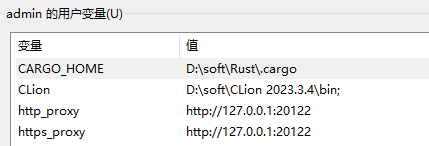
例如:最近的codex 桌面端就需要配置这个环境变量才能正常用
最后的武器:让进程强制走代理
有些程序 exe进程不会读取http_proxy的环境变量 使用工具强制让exe进程走代理
- 工具1 proxifier
- 工具2 ProxyBridge
- 例如 antigravity cursor等软件
关于 ProxyBridge 之前也写过文章 具体咋配置的
 Antigravity 非 TUN 代理方案ProxyBridge (Proxifier平替方案)
开发调优
Antigravity 非 TUN 代理方案ProxyBridge (Proxifier平替方案)
开发调优
1. 背景 Antigravity是谷歌的一个编辑器,里面免费模型挺多,但是进程不走系统代理,所以需要一个工具,将进程 xxx.exe 走代理;或者开启tun模式所有网络都走代理 看之前的帖子,大部分都是使用 Proxifier工具,这个是收费的且配置不方便,现在来一个平替方案 2. 平替方案 ProxyBridge: 跨平台,免费开源,中文友好,配置简单,WinDivert 驱动 per…
上面几个方案可以彻底解决windows系统大部分应用不走代理的问题
9 个帖子 - 4 位参与者
来源: LinuxDo 最新话题查看原文