我是 4 月底刚开始捣鼓 AI 辅助开发的新人,在众多 AI 模型中选择了 DeepSeek V4 系列,按照 DeepSeek API 文档中的做法,使用 Vizards.deepseek-v4-for-copilot 扩展将 DeepSeek V4 系列模型接入了 VS Code 内置的 GitHub Copilot。随后我选择了 DeepSeek V4 Pro 模型并启用了思考模式,让其为我修改一个使用 Node.js 的简易画廊(在此之前这个画廊是由多个不同 AI 通过在线对话的方式编写的,因此这个站点只有一个 .js 文件,HTML,CSS 与 JS 写在同一个文件中)
但在短短几个小时之内,我就遇到了一个很致命的问题,这个问题在我后续查阅了一些资料后才理解:使用 Pro 模型时,会在长对话后出现输入(未命中缓存)急剧上升,即使后续问的问题或提的需求很短很简单:
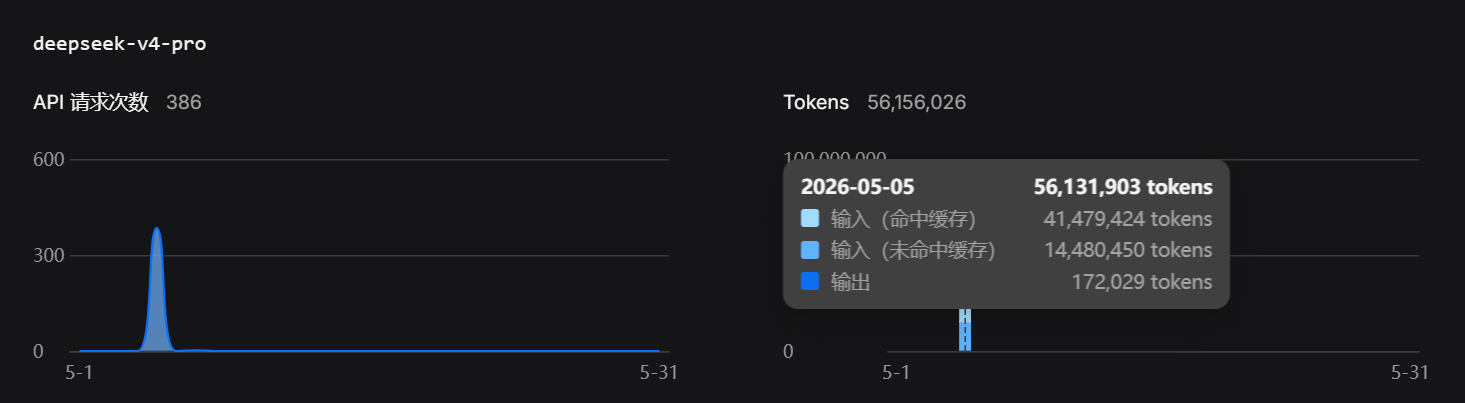
查看控制台的时候人都傻了,“刚打进去的 50 块钱这么快就要用完了?”,随即询问了一些网友,得到了一条关键解答:缓存命中率异常,很快我就找到了 Vizards.deepseek-v4-for-copilot 扩展的 GitHub 仓库,查看 Issues: github.com/Vizards/deepseek-v4-for-copilot Long-context prompt cache diagnostics and high miss-token cases 长对话 Prompt Cache 命中率异常日志收集 已打开 05:45AM - 03 May 26 UTC
 Vizards
tracking
Vizards
tracking
> [!NOTE] > **2026-05-08 Update**: Root cause analysis published. > Read the f…ull write-up, solution brainstorming, join the discussion in **#56**. > > This issue (#25) remains open for **reporting new cache miss patterns** and **sharing diagnostic logs**. ## Background / 背景 Some users have reported unusually high cost in long Copilot Chat Agent conversations with DeepSeek V4 Pro. The common symptom is that `prompt_cache_miss_tokens` grows unexpectedly, even when the follow-up prompt is very simple. 一些用户反馈在 Copilot Chat Agent 长会话中,即使后续只是问很简单的问题,DeepSeek V4 的 `prompt_cache_miss_tokens` 也会异常增长,导致费用明显上升。 ## Symptoms / 典型现象 Please comment here if you observe one or more of the following: 如果你遇到以下任意一种情况,欢迎在本 issue 下补充日志: - A long Copilot Chat conversation becomes much more expensive over time. Copilot Chat 长会话随着轮次增加,费用明显变高。 - A simple follow-up prompt still costs noticeably more than expected. 只是问一个简单的后续问题,也比预期贵很多。 - DeepSeek dashboard shows rapidly increasing `prompt_cache_miss_tokens`. DeepSeek 控制台显示 `prompt_cache_miss_tokens` 快速增长。 - Creating a new Copilot Chat conversation significantly reduces cost. 新建 Copilot Chat 对话后,费用明显下降。 - Only a few prompts in an otherwise normal session become unusually expensive. 整体会话大部分轮次正常,但其中少数几轮 prompt 费用异常高。 ## How to collect logs / 如何收集日志 Starting from `v0.4.0`, the normal extension build includes cache diagnostics. No special VSIX needed. 从 `v0.4.0` 开始,正式版插件已内置缓存诊断,不需要安装特殊版本。 1. Install or update to the latest public version (`v0.4.0` or newer). 安装或更新到最新正式版。 2. Enable debug logging in VS Code settings: 在设置中开启 Debug: ```json { "deepseek-copilot.debug": true } ``` 3. Reload Window or restart VS Code. Reload Window 或重启 VS Code。 4. Reproduce the issue in the original long conversation if possible. 尽量在原本出现费用异常的长会话里复现。 ## Recommended reproduction steps / 推荐复现方式 Ask 1-3 lightweight follow-up questions in the original conversation. For example: 在原本的会话中问 1-3 个轻量问题,例如: ``` Please briefly summarize the latest conclusion based on the current conversation context. Do not read files and do not modify files. ``` 中文: ``` 请基于当前对话上下文,简单总结你刚才的结论。不要读取文件,不要修改文件。 ``` To reduce noise, please try to keep these unchanged during the test: 为了减少干扰,请尽量保持: - Do not switch model / 不切换模型 - Do not switch Thinking Effort / 不切换 Thinking Effort - Do not switch between Chat, Ask, and Agent modes / 不切换 Chat、Ask、Agent 模式 - Do not attach new images or files / 不附加新图片或新文件 - Do not ask the Agent to scan the whole project / 不让 Agent 扫描整个项目 - Do not ask the Agent to modify files / 不让 Agent 修改文件 ## Uploading logs / 上传日志 Run `DeepSeek: Show Logs` from the Command Palette, then save and upload the full log as a file (preferred over pasting long text). 运行 Command Palette 中的 `DeepSeek: Show Logs`,将完整日志保存为文件上传。 If possible, please also mention: 如果方便,也请说明: - Model & mode used / 使用的模型和模式(Agent / Ask / Chat) - Whether the conversation included images or file attachments / 是否包含图片或文件附件 - Whether VS Code was restarted or reloaded before the expensive turn / 费用异常前是否重启或 Reload ## Privacy / 隐私说明 The diagnostic logs only include counts, lengths, hashes, model identifiers, cache statistics, and structural markers. Please still review the logs before posting and remove anything you consider sensitive. 诊断日志只包含计数、长度、hash、模型标识、缓存统计和结构化 marker。提交前仍建议自行检查,并删除任何你认为敏感的内容。
原来不止我一个人遇到了类似的问题
这个扩展在几天前还因为未知原因被从扩展商店下架了,目前还没有重新上架
我是一个图形界面爱好者,因此我很喜欢 GitHub Copilot 的操作方式,与 VS Code 深度集成的它还会自动调用各种工具与服务,默认就会使用 Playwright MCP 测试网页等
因此,我想请教佬友们一个问题:是否有类似的扩展,能够为 GitHub Copilot 自定义 API 地址、API Key、模型列表等配置?
相关链接:
 api-docs.deepseek.com

接入 GitHub Copilot | DeepSeek API Docs
DeepSeek V4 for Copilot Chat 是一个 VS Code 插件,将 DeepSeek V4 Pro 和 Flash 直接添加到 GitHub Copilot 的模型选择器中。你仍可使用 Copilot 的 Agent 模式、工具调用、Skills 和 MCP — 全部由 DeepSeek 驱动。
github.com
GitHub - Vizards/deepseek-v4-for-copilot: Pick DeepSeek V4 from the Copilot Chat model...
Pick DeepSeek V4 from the Copilot Chat model picker — and keep everything else Copilot already gives you.
3 个帖子 - 3 位参与者